.png?width=46&height=30&name=Logo-symbol%20(1).png)
The “Coach Expert” step gives access, from the training path, to a Coach Expert already created in your studio: the learner can ask it questions when they need to during their training.
Table of contents
- Add a Coach Expert
- Set up the step
- Set up the advanced options
- What the learner sees
- Frequently asked questions
Add a Coach Expert
- Open the training path, then the section where you want to add the step.
- Click “Add a step”.
- Choose “Coach Expert”.
- In “Search for and add a Coach Expert”, click the Coach Expert you want. If it does not exist yet, create it first: see Create a Coach Expert.
Set up the step
- “Title” (required): for example “Ask the safety coach a question”;
- “Modality”: “Coach Expert” by default;
- “Duration” (required);
- in “RELATED CONTENT”, the eye icon shows a preview of the Coach Expert, and the arrows icon lets you choose another one.
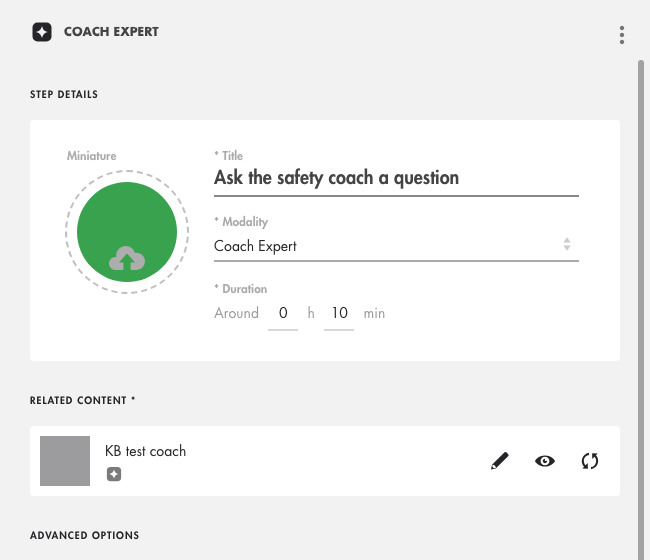
Click on the image to open it in a new tab.
Set up the advanced options
In “ADVANCED OPTIONS”, at the bottom of the panel:
- “Conditions of access”: “Always accessible” (default), “Validate first...” (then “…the previous step” or “…all previous steps”), “From…” or “Until…”;
- “Include the step in the calculation of the total mastery”: leave it off; this type of step does not provide mastery (only Teach Up modules, assessments and SCORM packages do);
- “Validation condition”: “The learner has finished the activity”.
These options are explained in Create a training path.
What the learner sees
By clicking the tile, the learner opens the Coach Expert in the training path and asks their question. The step shows “Completed” as soon as the learner has opened the Coach Expert, even without asking a question.
Frequently asked questions
Can the author see the learner's exchanges?
No. The Coach Expert dashboard (“PROBLEMS” tab) shows the title of each problem, summarised by the Coach, its type, the learner, the status, the number of interactions and where it comes from (for example the training path), but not the content of the exchanges. See Find the results of a Coach Expert.
Does the step count in the training path's mastery?
No: a Coach Expert does not provide mastery. Leave the option off.