.png?width=46&height=30&name=Logo-symbol%20(1).png)
The “Event” step adds a key moment, face-to-face or remote: a workshop, a virtual class, a kick-off meeting… You enter its description, date, location or connection link.
Table of contents
- Add an event
- Set up the step
- Set up the advanced options
- What the learner sees
- When is the step completed?
- Frequently asked questions
Add an event
- Open the training path, then the section where you want to add the step.
- Click “Add a step”.
- Choose “Event”.
Set up the step
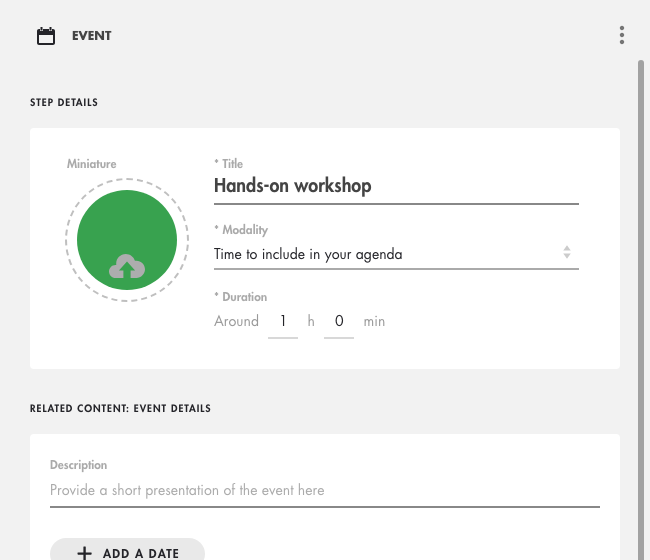
- “Title” (required) and “Miniature”;
- “Modality”: “Time to include in your agenda” by default, or for example “Classroom” or “Virtual class”;
- “Duration” (required): the length of the event;
- “RELATED CONTENT: EVENT DETAILS”: a “Description”, then, if needed, “ADD A DATE”, “ADD A LOCATION” and “ADD AN INTERNET LINK” (Teams, Zoom…).
Click on the image to open it in a new tab.
Set up the advanced options
An “Event” step has no access condition. Its advanced options are inclusion in the total mastery (leave it off: an event does not provide mastery) and the validation condition, “The learner has confirmed their participation in the event.”
What the learner sees
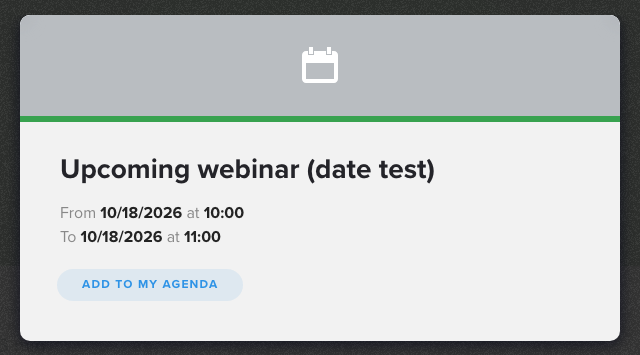
By clicking the tile, the learner sees the title, the description and the information you added. If a date is set, they see the start and end dates and times and the “ADD TO MY AGENDA” button.
Click on the image to open it in a new tab.
When is the step completed?
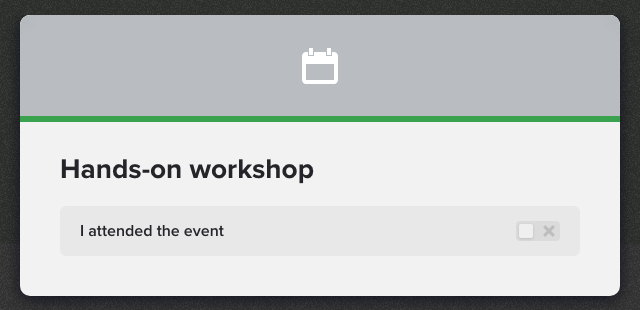
- Without a date: the learner turns on “I attended the event”. The step shows “Completed” when they go back to the training path.
- With a date: the step cannot be completed before the event ends. In our tests, an upcoming event stayed not completed when opened; a past event changed to “Completed” when the learner opened the step.
Click on the image to open it in a new tab.
Frequently asked questions
Can the learner complete the event without attending it?
Yes: completion relies on their own statement (without a date) or on opening the step after the event (with a date). To check attendance, use your own attendance sheet.
Why can't I set an access condition on an event?
This setting does not exist for this type of step. You can, however, set an access condition on the section that contains it.