
Duplicating allows you to easily create multiple versions of your creations.
Summary
Duplicate a course or an assessment
To duplicate a course or an assessment, follow these steps:
- Go to your studio homepage and locate the course or assessment you want to duplicate.
- Click on the options icon (three dots) at the top right of the course thumbnail view or to the right of the course in list view.
- Select "Duplicate this course
 ".
By default, Teach Up suggests keeping the original name followed by "- Copy".
4. Click "Duplicate this course" to finalize the duplication.
Duplicate a training path
To duplicate a training path, select the three dots  next to the path, then choose "Duplicate this training path".
Duplicating a training path does not duplicate the courses it contains. The original courses will be present in the copied path as well. This means that any modification made in Path A (original) will also affect the courses in Path B (copy).
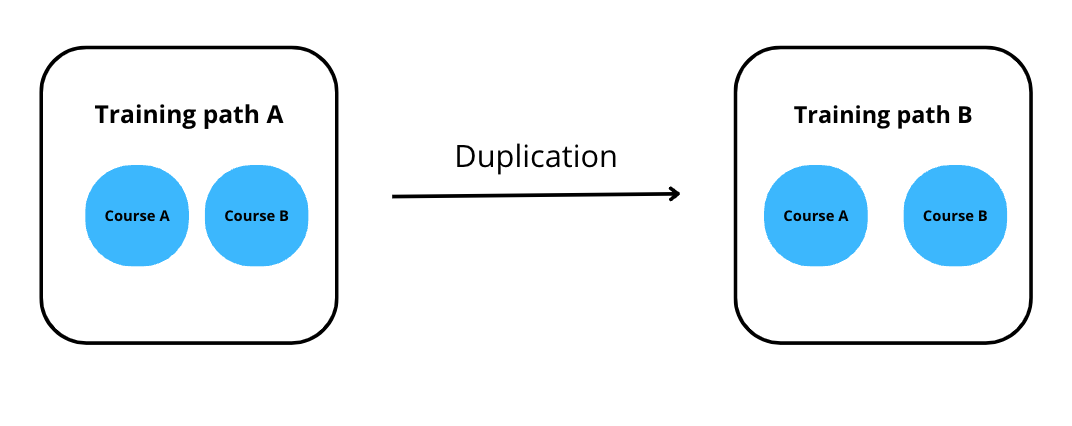
To create two independent paths (Path A and Path B), follow this process:
- Duplicate each course contained in Path A. They will be named with the same name followed by "- Copy", e.g., Course A - Copy.
- Duplicate Path A (original) to get Path B (copy).
- Replace all the duplicated courses in Path B.
Frequently Asked Questions
Can I duplicate a training path without affecting the original courses?
Yes, but not by duplicating the training path alone: the copy uses the same courses as the original. Duplicate the courses first, then the training path, and replace the courses in the copy (see the procedure above). If the send-a-copy option is enabled on your account, sending a copy of the training path is quicker: the copy is independent, and its courses are copied too.
Is it possible to modify a course in one path without affecting other paths?
Yes, but only if the courses have been duplicated and replaced in each path. Otherwise, any changes to a course will affect all paths containing that course.
How do I know which courses have been duplicated?
By default, duplicated courses have the same name followed by "- Copy" (you can change the title when duplicating). For example, Course A becomes Course A - Copy.
What should I do if I’ve already duplicated a training path but not the courses?
You can still duplicate the courses and manually replace them in the copied path to make the paths independent.
Is it possible to duplicate content created within a course?
As of now, this option is not available. Individual content inside a course cannot be duplicated.
Can I keep a copy of a course before editing it?
Yes, by duplicating it. Teach Up does not keep a version history: once changes are made, you cannot go back to a previous version. To keep the current version of a course, an assessment, or a training path, duplicate it before editing it. For a training path, the copy uses the same courses as the original: duplicate the courses too if you plan to edit them.